Auditing an Inherited Power BI Report
Inheriting someone else’s Power BI report is a special kind of stress. The original developer is gone, the documentation doesn’t exist, and you’re expected to maintain (or fix) a model you’ve never seen. Before you change a single measure, you need to understand what you’re holding: how the data flows, what the measures actually do, what depends on what, and where the landmines are. This guide walks through a repeatable audit process that turns an opaque inherited report into something you own.
Why audit before you touch anything
The temptation is to dive straight into the problem you were handed — a broken visual, a wrong number, a slow refresh. Resist it. A report you don’t understand is a report where every “small fix” risks breaking something invisible downstream. An upfront audit costs a few hours and saves you from the far more expensive experience of shipping a change that quietly corrupts numbers across dashboards you didn’t know existed.
The audit has one goal: replace guesswork with a map.
Step 1: Assess the data sources and refresh
Start where the data enters the model. For each table, identify the source system, the connection type (import vs. DirectQuery), and the Power Query transformations applied on the way in. Check whether the refresh actually works and how long it takes. A report that fails to refresh is a different problem than one that’s merely confusing.
Flag anything fragile. That means hardcoded file paths, references to a personal machine or account, or sources nobody can explain. These are the first things to break and the first things you should explore further.
Step 2: Map the model structure
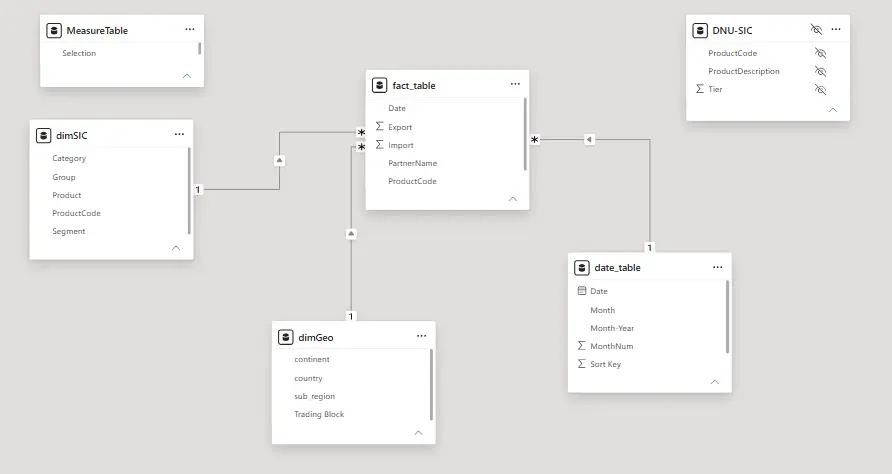
Move to the model view and document the tables and relationships. For each relationship, note the cardinality, the filter direction, and whether it’s active. Look for warning signs: bidirectional relationships that don’t need to be, many-to-many links, ambiguous filter paths, and disconnected tables that may be orphaned or may be doing something subtle.
This is also where you build the inventory that the rest of the audit hangs on. If you want the full process for capturing this properly, see how to document a Power BI data model — an audit and good documentation produce the same artifacts.
Step 3: Understand the measures and their dependencies
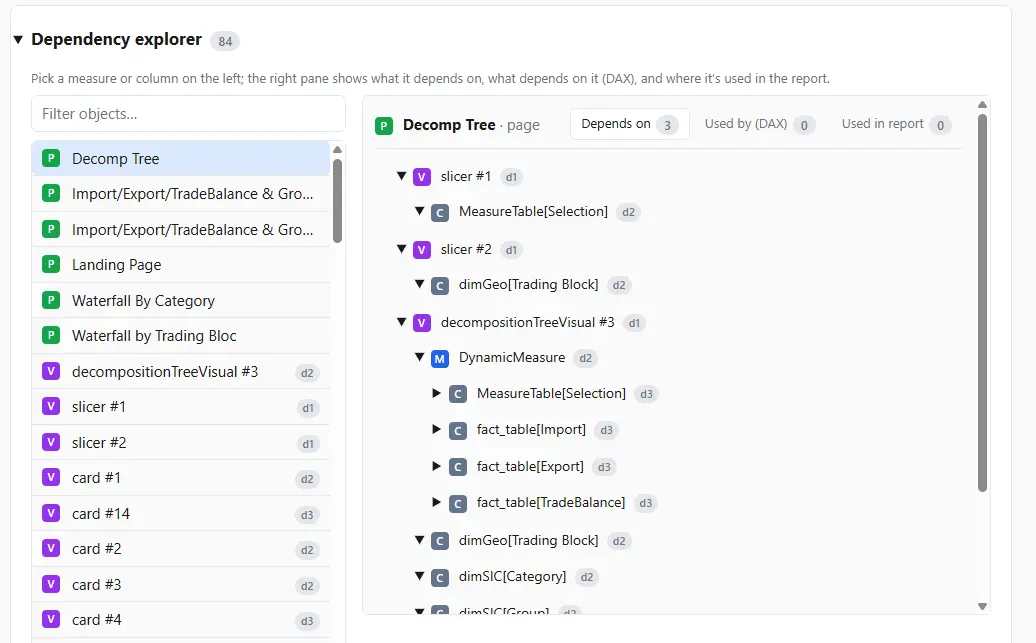
Measures are where the business logic and the risk concentrates. Catalog them, then trace how they connect. Which measures are foundational base measures, and which are built on top of others? A measure ten layers deep behaves very differently under a change than a standalone one.
Mapping this by hand on an unfamiliar model is slow and error-prone. Having a dependency tree shows you the full chain before you assume anything. DAX Prism builds these trees automatically, so you can see what relies on what without opening definitions one at a time.
Step 4: Find the dead weight
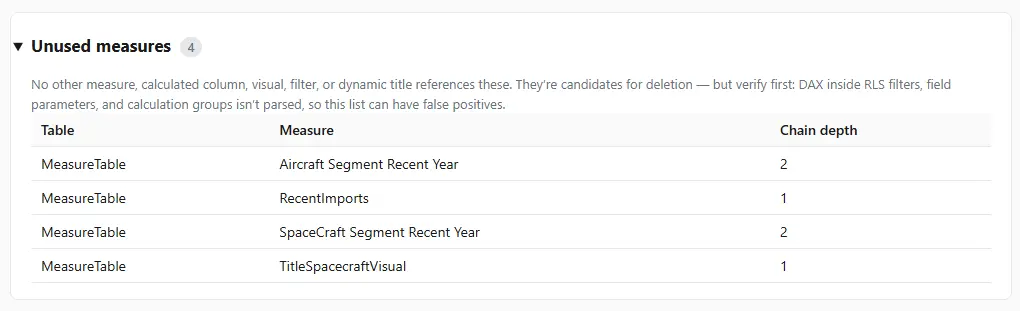
Older reports accumulate a lot of extra stuff. Measures nothing uses, duplicate calculations, “temp” columns that shipped to production. Identifying unused measures in Power BI tells you what’s safe to ignore — and eventually, what’s safe to remove. Just be careful: a measure can look unused while still being referenced by another measure or a hidden visual, so confirm with the dependency tree before deleting anything. When you are ready to clean up, do it without breaking visuals.
Step 5: Catalog the tech debt
The final pass is judgment, not inventory. Now that you understand the model, write down what’s wrong with it: overly complex DAX, naming that fights you, missing documentation, fragile sources, relationships that work by accident. You don’t have to fix any of it yet. The point is to make the debt visible so you can prioritize it and set expectations with stakeholders.
A short, honest tech-debt list is also your best tool for the conversation about how much time maintenance will really take.
Turning the audit into a deliverable
By the end of these five steps you have: a source-and-refresh summary, a model map, a measure-dependency picture, a list of dead weight, and a tech-debt register. Together, that is the documentation the report never had. Save it alongside the model, keep it current as you make changes, and the next person to inherit this report starts with a map instead of a mystery.
Frequently asked questions
How long should auditing an inherited Power BI report take? For a moderate model, a focused audit is a few hours to a day. Automated tools that generate inventories and dependency trees cut the structural part down significantly, leaving you to add judgment and context.
What should I look at first? Start at the data sources and work toward the visuals: sources and refresh, then the model and relationships, then measures and dependencies, then dead weight and tech debt.
How do I know which measures are safe to change? Trace dependencies first. A measure with nothing built on top of it is low-risk; a foundational base measure that dozens of others reference is high-risk. See tracing measure dependencies in DAX.
Can I automate the audit? The structural parts, yes. Inventories, dependency trees, and unused-object detection can be generated automatically. The judgment parts, like assessing tech debt and confirming business intent, still need you.
What’s the difference between an audit and documentation? An audit is the process of understanding an unfamiliar report; documentation is the artifact it produces. Do the audit well and you’ve written the documentation as a side effect.