How to Find Unused Measures in Power BI
Over time, Power BI reports tend to collect measures nobody uses. These measures could be from experiments that were never deleted, calculations from a report page that got removed, duplicates created because no one could find the original. They clutter the field list, slow down anyone trying to understand the model, and make every audit harder than it needs to be. This guide explains how to find unused measures in Power BI, and just as importantly, how to avoid the trap of deleting a measure that only looks unused.
What “unused” actually means
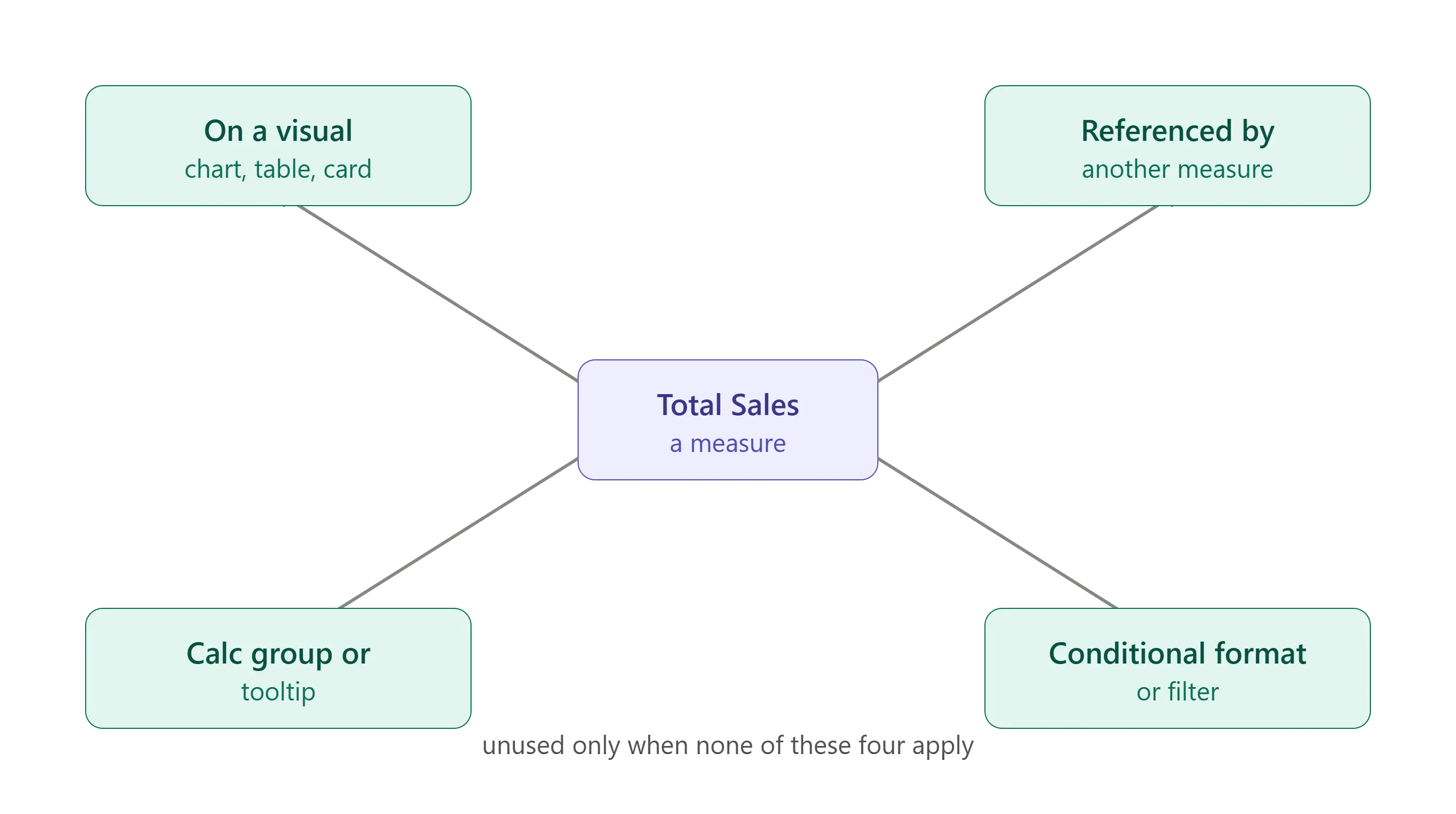
A measure is unused when nothing depends on it and nothing displays it. In practice, “using” a measure can happen in several ways:
- It appears on a visual in a report page.
- It’s referenced by another measure.
- It’s used in a calculation group, a tooltip, or a drillthrough.
- It’s referenced in conditional formatting or a visual’s filter.
A measure is only truly unused when none of these are true. That last point is where most cleanup mistakes happen. A measure can be absent from every visual yet still be referenced by another measure that is on a visual. Delete it and you break the parent.
Why unused measures are worth finding
Removing dead measures isn’t just tidiness:
- Clarity. A field list with 200 measures, 60 of them dead, is far harder to navigate than one with 140 live ones.
- Maintainability. Every unused measure is something a future maintainer has to read, understand, and rule out.
- Trust. Duplicate and abandoned measures are how two visuals end up showing slightly different “totals.”
For anyone auditing an inherited Power BI report, finding the dead weight is a core step.
How to find unused measures manually
Power BI doesn’t have a built-in “show unused measures” button, so the manual approach is a process of elimination:
- List every measure in the model.
- Check each report page and note which measures appear on visuals, in filters, and in conditional formatting.
- Check measure definitions for references to other measures.
- Cross off every measure that appears anywhere in steps 2 and 3.
- What remains is your candidate list of unused measures.
The catch: this is tedious and easy to get wrong. Conditional formatting and tooltip references are easy to overlook, and on a model with hundreds of measures across dozens of pages, the odds of missing one are high. This means the odds of deleting something you shouldn’t are also high.
A faster, safer way
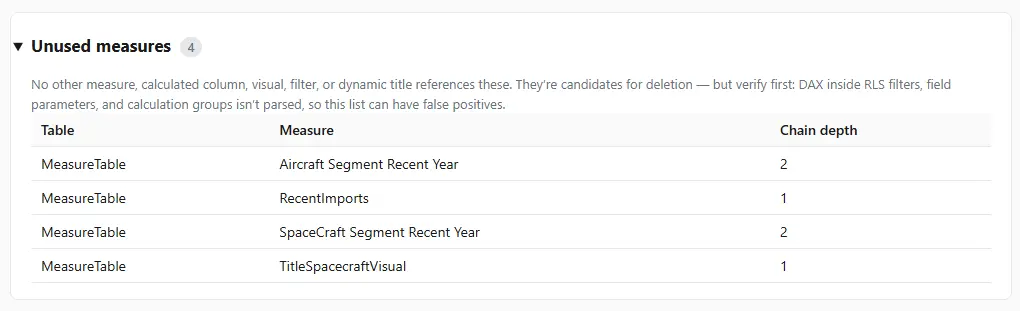
Because every reference is encoded in the model (in DAX definitions, visual configurations, and formatting rules) a tool can scan all of them and report which measures are referenced nowhere. That removes the two weaknesses of the manual method: it doesn’t miss references, and it does it in seconds rather than hours.
This is what DAX Prism does: it scans the whole model and flags measures with no upstream references, so your candidate list is complete and accurate. From there you can review the dependency tree for each one to confirm it’s safe to remove.
The “looks unused but isn’t” trap
The single most important rule: an empty search result on the report pages does not mean a measure is safe to delete. A measure can be invisible on every page and still be load-bearing. It can be referenced by another measure, a calculation group, or a hidden element. This is why dependency tracing and unused-measure detection go together: one tells you what isn’t on a visual, the other confirms whether anything else relies on it.
Before deleting, always confirm a measure is unused in both senses. You need to know that its not displayed and not referenced. When you’re confident, clean it up without breaking visuals.
Frequently asked questions
Does Power BI have a built-in way to find unused measures? No. There’s no native “unused measures” view, so you either check references manually across every page and definition, or use an external tool that scans the whole model.
Is a measure that’s not on any visual safe to delete? Not necessarily. It may still be referenced by another measure, a calculation group, conditional formatting, or a tooltip. Confirm nothing depends on it before deleting.
Why do models accumulate unused measures? Experiments that were never cleaned up, measures left behind when a report page is removed, and duplicates created when the original couldn’t be found.
How do I find unused measures and columns together? The same principle applies to columns. A tool that scans the model can flag both unreferenced measures and unused columns in one pass.
What should I do after finding them? Confirm each is truly unreferenced via its dependency tree, then remove them carefully.